


Are you interested in learning about the UX design process step by step? Understanding its significance is a good starting point.
According to research, approximately 80% of customers are willing to pay a premium for a superior user experience. Therefore, in addition to generating profits and enhancing your product’s quality, UX is critical for cultivating a devoted following and ensuring effective collaboration among your design team.
This article provides insight into the most crucial stages of the UX design process, the significance and essential principles of UX design, key steps in the design process, best practices and much more. Keep on reading to dive into this topic!
What is the UX Design Process?
The UX design process involves crafting product designs that deliver a valuable experience to users. It encompasses all design efforts to create websites or mobile apps that are intuitive, easy to navigate, and user-centric.
The UX design process prioritizes enhancing the following aspects of digital products:
- Usability
- Accessibility
- Functionality
- Branding
- User satisfaction with design
While UX is a commonly used planning process in the design industry, it is tailored to the specific project and can be applied to simple platforms like a website homepage, as well as more complex interfaces, depending on the project’s unique needs.
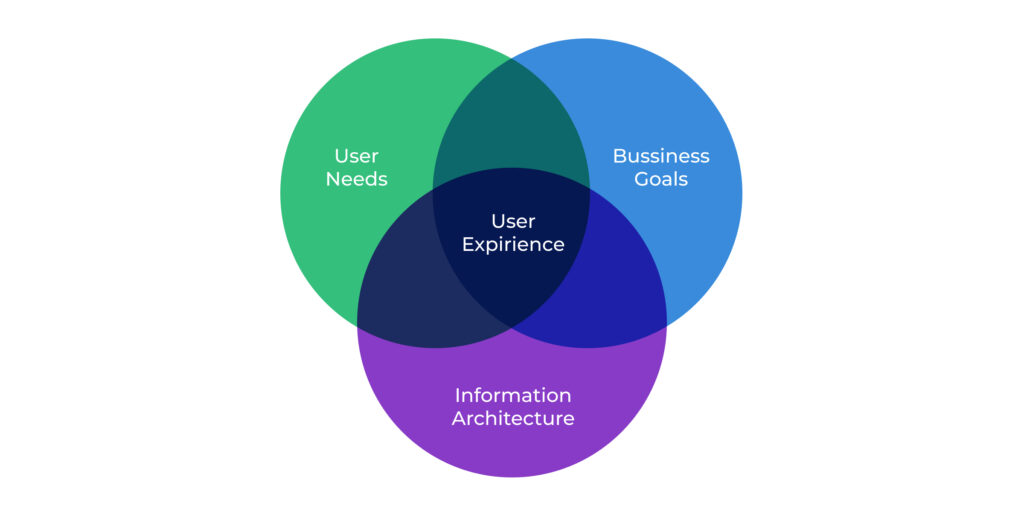
Different projects require different UX approaches. However, some practices and deliverables are universal and should be implemented consistently across all projects. These include conducting product research before moving on to prototyping.
The Significance of UX Design in Software Development
In software development, UX design is crucial for websites and mobile apps. Without a solid UX design process, a product may fail to meet users’ needs and consequently lose credibility with its consumer base.
A decline in software loyalty can lead to a drop in user numbers, as well as a negative impact on profits and reputation. These statistics reinforce the importance of UX design:
- 88% of users will only return to a website with good UX (according to Hubspot).
- 90% of users will stop using a mobile app due to unsatisfactory performance.
- E-commerce businesses lose 35% of sales due to poor user experience (as per an Amazon Web Services study).
By implementing a clear and concise UX process, a design team can more easily create product designs that provide exceptional user experiences.
Industries That Place the Highest Importance on UX Design
The UI/UX design process can greatly impact the success of products across various business industries. However, there are some sectors where a thoughtful user experience is particularly crucial. Let’s delve into them in greater detail:
Real Estate Software
UX design plays an important role in the real estate industry, and here’s why.
Digital products in this niche typically aim to sell or rent real estate. These products should enable users to conveniently view housing offers, conduct transactions, and access all relevant information about the property.
If your software has poor UX design, it can have a negative impact on your audience. From an ordinary user’s perspective, they need a simple solution that allows them to buy or rent a home in just a few clicks. From the viewpoint of real estate agents or landlords, the software should be easy to use for posting housing offers and more.
Healthcare Software
When it comes to healthcare software, the importance of UX design becomes even more critical. How should your software look if everyone, regardless of age, needs to see a doctor occasionally? The main objective is to ensure that your product is accessible to any user, including medical professionals who require remote patient monitoring apps.
eCommerce Software
A well-thought-out UI/UX design process can guarantee higher earnings and more loyal customers for eCommerce businesses. According to Amazon Web Services, companies that invested significant budgets in their digital products’ UX saw a sales increase of 75%. Even businesses that allocated less money to user experience could still witness a 60% increase.
FinTech Software
The finance industry can be challenging for the average customer to understand, so FinTech software should provide the smoothest possible user experience. For instance, financial apps should offer hints for financial terms and display complex information in simple graphs and charts.
Essential Principles of UX Design
A solid understanding of UX design concepts and terminology is essential for successfully implementing an effective design process that meets your business needs. Let’s explore some key concepts:
Design Thinking
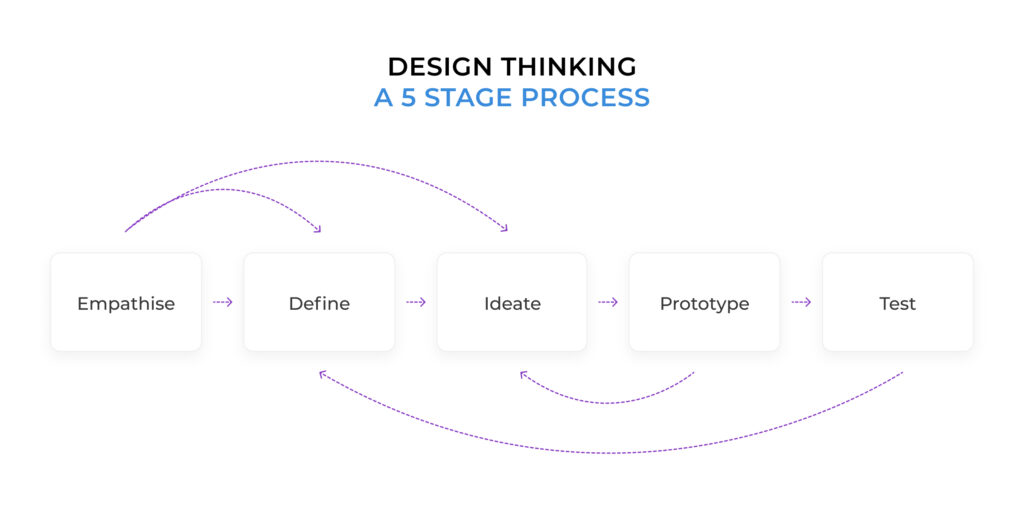
Design thinking is a central aspect of UX design that prioritizes human-centered designs. It is a methodology that takes a solution-based approach to address human-related problems. The design thinking process typically involves five stages:
- Empathy
- Definition
- Ideation
- Prototyping
- Testing
Design Sprint
The Design Sprint is a systematic process based on design thinking that helps teams leverage the design thinking mindset to make data-driven decisions. The process takes place over a five-day period, during which teams answer critical business questions and solve problems through design, prototyping, and testing ideas with customers.
The concept of the Design Sprint was created by Jake Knapp while working at Google, and the methodology is described in his best-selling book, Sprint.
Although design sprints can be stressful, the process can create a sense of cooperation and togetherness within the team. The creative activity requires relaxation and revitalization of teammates to ensure that only the best ideas come forth.
The Lean UX vs. Agile UX
In addition to design thinking, there are other approaches to establishing an effective design process, such as Lean UX and Agile UX. Let’s explore the differences between them.
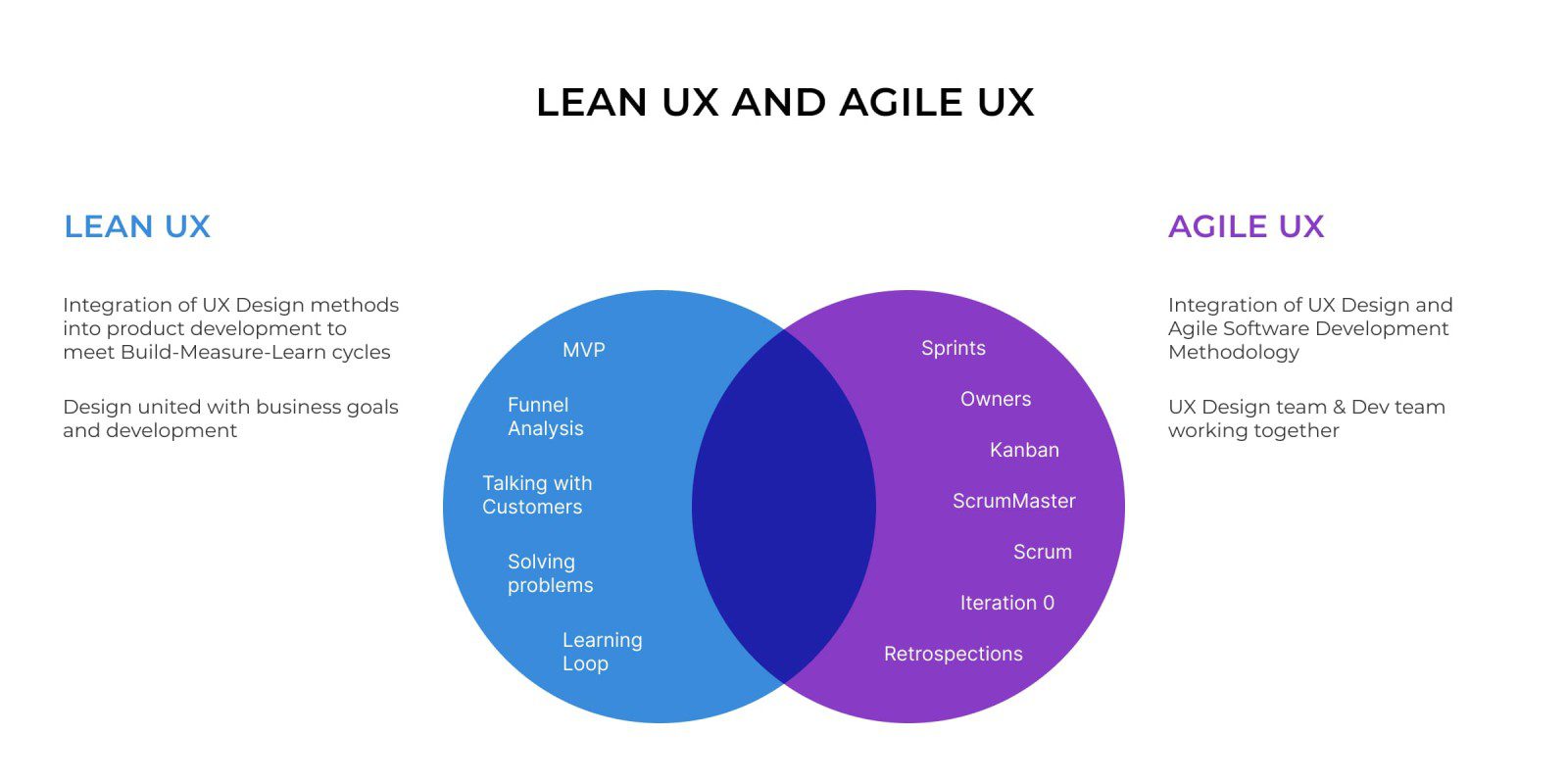
Lean UX is a product design process that applies lean principles. Jeff Gothelf published this idea in 2013 and is still one of the most prominent authors on Lean UX. It unites product development and business through constant measurement, using “learning loops” of build-measure-learn synchronization.
On the other hand, Agile UX is an update of Agile Software Methodology that incorporates UX design methods. Its primary goal is to unify developers and designers in the Agile product development process. While Lean UX specifically refers to methods and applications used in the dynamic environment of a Lean Startup.

Lean UX teams often use agile UX to coordinate their software development efforts, as both methodologies can complement each other. Agile is a popular choice for startups looking to streamline their software development process.
Aside from these methodologies, there are other commonly used UX design methods and techniques. However, before applying any of them, it is crucial to establish a consistent design process that includes all the stages of the UX system.
Let’s take a closer look at the most important stages of the UX design process.
Key Steps in the UX Design Process: An Overview of the 8 Essential Stages
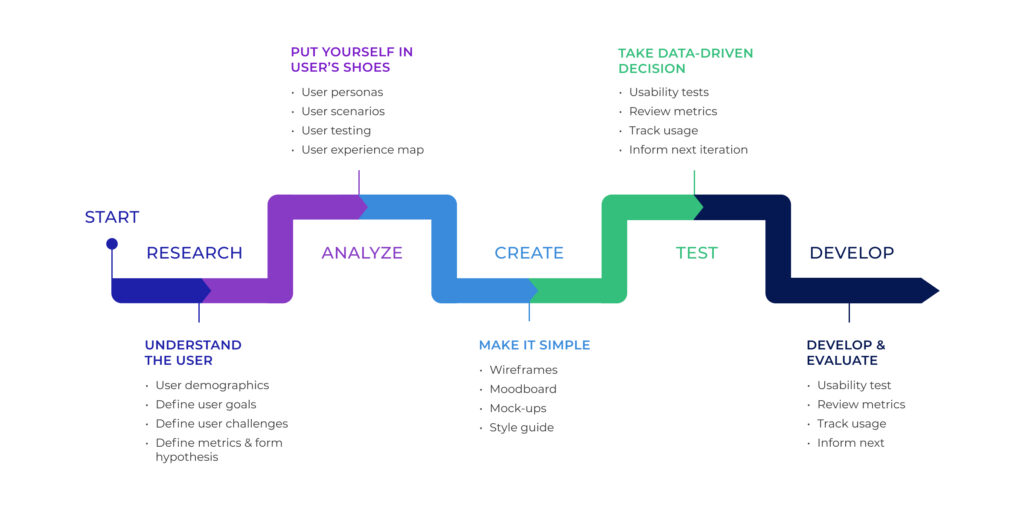
The UX design development process consists of several stages that can be grouped into major phases. These phases are fundamental to all UX design approaches and include the following:
1. Stakeholder Interviews
Stakeholder interviews are a crucial stage in the UX design process, as they help define your business goals, vision, values, and product strengths and weaknesses. The stakeholders’ opinions are essential for further developing your project, making it the first step to establishing the UX app design process.
To ensure productive stakeholder conversations, you should first decide whom to interview and whose opinion matters most for your project. It is also essential to record all the discussions and provide them to the UX designers for analysis.
By the end of this phase, you and your team will clearly understand the product’s goals.
2. Understanding User Needs
User research is a crucial aspect of the UX design process as it aims to create the best user experience. This phase lets designers empathize with the users and understand their problems and needs.
The designer can use various methods, such as interviews, surveys, and observations, to conduct user research. It starts with studying the problem space, planning interviews with stakeholders and potential users, and researching product competitors.
3. Creating User Personas and Sitemaps
User personas are reliable and realistic representations of a key audience segment that designers can reference. However, it’s important to note that personas represent a user story and flow, not the opinions of all possible users. They aim to form a consistent target group to understand their motivations and problems.
Creating a user sitemap or flow is also crucial as it helps designers visualize the user journey through the product. This step aids in identifying pain points and areas for improvement.
4. Creating Information Architecture
Developing the information architecture is a critical stage in the UX design process. Sitemaps are used to display the website’s structured navigation, demonstrating the relationship between different pages.
5. Developing Wireframes
Wireframes are a visual representation of the page structure in the design process. They serve as the backbone of the product and are often used as the framework for mockups. Various tools, including Sketch, Figma, Axure, Adobe XD, and Balsamiq, can be used to create wireframes with an aesthetically appealing and robust design.
6. Developing Interactive Prototypes
Once the wireframes are approved, the UX designer moves on to developing interactive prototypes. This stage involves designing the actual interface of the UX using software such as Sketch, Photoshop, or Illustrator. The interactive prototype serves as the point of intersection between UX and UI.
7. Testing the Prototype
This step in the UX design process is crucial to determine if the solution works as planned and efficiently provides the intended services. Paper and digital prototype testing are the forms of prototype testing that can be used in the UX project.
8. Iteration
The final stage of the UX design process involves developing the project design based on user feedback and opinions from other stakeholders. Iteration refers to the iterative process of refining the design, which is the final editing stage of the design outlook.
Here how it looks like together:
Top UX Design Best Practices
By adopting these tips, you can improve the quality of your UX design process and deliver better user experiences:
Engage with Your Audience during User Research
Communicating with your audience is crucial during the initial phase of UX design, where you gather user feedback through surveys and other research methods. Engaging the right audience and using the right metrics to select feedback for designing the UX is essential.
Try the UX Design Sprint Approach
The UX design sprint is a five-day process for answering critical business questions, including designing, prototyping, and testing ideas with users. Many companies use this approach to define product direction, build team culture, and reveal their strategy.
Explore New Tools
To develop an excellent website or mobile application, designers must try new tools during the software design development stages. Being flexible and open to new tool-choice options allows creative and efficient UX designs.
Gather Feedback from Users
After testing the design with users, providing a platform for feedback is important. User feedback is the fuel that drives the UX process.
Analyze and Optimize
It’s necessary to analyze and optimize the process properly in order to improve the existing gaps in the UX process.
Six Essential Qualities Every UX Designer Should Possess
After familiarizing yourself with the essential phases and best practices of the UX design process, it’s crucial to recognize the crucial role that UX designers play in this activity.
Below are the critical qualities that an experienced specialist should possess.
1. Effective Communication Skills
Effective communication skills are vital to ensure that the designer comprehends and articulates your product’s objectives and can clearly communicate their vision. This skill is essential during the user research phase and interviews.
2. Empathy
Empathy, or compassion, is another fundamental quality every UX designer should possess. By putting themselves in the users’ shoes and understanding their pain points and requirements, your designer can offer the best solution for your audience.
3. Analytical Thinking
Strong analytical skills are vital for a UX designer to evaluate user feedback and data, identify patterns and connections, and create effective design solutions.
4. Technical Competence
While a UX designer does not have to be a coding expert, having a fundamental understanding of how developers work and coordinating with them is crucial to ensure seamless design implementation.
5. Self-assurance
In addition to the aforementioned qualities, successful UX designers should possess confidence in their design solutions, communicate their ideas effectively, and make informed design decisions.
6. Continuous Learning
An excellent UX designer should be eager to learn and adapt to new tools and current user experience trends to stay relevant and innovative.
Final Thought
Creating a website or application demands UX designers to deliver an experience meeting users’ expectations. Therefore, carefully considering various approaches to UX design development is crucial, as it directly impacts the website’s turnover rate per click.
Outsourcing your design development to an established IT company with a consistent UX design process is often more efficient than building your design team from scratch.
Find yourself a team that has extensive experience in design services and is committed to delivering results that align with your product needs and ensure user satisfaction with your product design to benefit your business!

Right Firms
22 Apr 2023


Latest Posts





Submit Your Inquiry
Related Posts

Jan 2026
7 Best Leading Companies in Automotive Software Development
Today's car isn't just metal on wheels with an engine anymore. It's a computer that happens to drive. Premium models can have more lines of code than a fifth-generation fighter jet. And it's the software that determines whether your car will be safe, convenient, and competitive in the market at all. Electrification, autonomous driving, connected services – all of this requires massive investments in software development. Traditional automakers suddenly realized they can't handle it on their own anymore. They need specialists who understand AI, cybersecurity, cloud technologies, and over-the-air updates. In this article, we'll tell you about the companies that write the code for millions of cars on the road. And we'll analyze why large manufacturers are turning to external partners en masse. What's Happening in the Automotive Market Right Now Tesla proved one simple thing: a car can be improved after purchase. Through the internet. At night, while you're sleeping. Your electric car wakes up with new features, better autopilot, or increased range. Magic? No, just competent vehicle software development. Now everyone wants the same. Mercedes presents MBUX with a voice assistant that understands natural language. BMW is investing billions in the Neue Klasse platform, where software will become the foundation of everything. Volkswagen is creating its own VW.OS operating system. General Motors is developing Ultifi – a software platform for all its brands. The Chinese have gone even further. NIO, XPeng, Li Auto – their cars look more like smartphones on wheels. Huge screens, voice control, smart home integration. And most importantly – constant updates that add new capabilities. Autonomy is a separate story. Waymo is already transporting passengers without drivers in San Francisco and Phoenix. Cruise is testing its robotaxis. Traditional manufacturers aren't sitting idle either: Ford is working with Argo AI, GM is investing in Cruise, and Honda has joined forces with General Motors for joint development. Electrification has changed the rules of the game. An electric vehicle is mechanically simpler but more complex in terms of software. You need to manage the battery, optimize regeneration, calculate routes taking into account charging stations. Energy management systems are becoming critically important. Industry Challenges: Why Automakers Are Looking for Partners Traditional automotive companies were built to manufacture mechanics. Their DNA is engines, suspensions, transmissions. Software was always on the periphery, something secondary. Now it's becoming the heart of the car, and Detroit, Stuttgart, and Wolfsburg suddenly discovered they're catastrophically short of the necessary specialists. The first challenge is talent shortage. A young programmer chooses between Google, Apple, or an automotive concern in a provincial town. The choice is obvious. Salaries at tech companies are higher, projects more interesting, working conditions better. Automotive has long been not the sexiest segment for developers. The second challenge is speed. The auto industry is used to development cycles of 5-7 years. In the software world, a product can become outdated in months. When Volkswagen tried to create its own software for the ID.3, the project was delayed for years. Cars stood in parking lots, waiting for code refinement. The third challenge is complexity. A modern car contains dozens of electronic control units, millions of lines of code, countless communication protocols. All of this must work cohesively, safely, and reliably. A bug in the code can cost lives. The fourth challenge is security. Cyberattacks on cars are already a reality. Hackers have demonstrated how to remotely hijack control of a Jeep Cherokee. Every internet connection is a potential vulnerability. We need cybersecurity experts that traditional auto companies simply don't have. The fifth challenge is the business model. Software development for automotive industry isn't a one-time development. It's constant support, updates, vulnerability fixes. You need infrastructure for over-the-air updates, servers, data analytics. Automakers understand: they need partners who already have this expertise. That's why we're seeing a massive wave of partnerships. BMW is working with Microsoft Azure, Volkswagen with Amazon Web Services, GM with Google Cloud. Major concerns have realized: it's better to find a reliable partner than to spend years trying to catch up with Tesla on their own. Market Leaders: Who Develops Software for Cars DXC Technology You know how big corporations sometimes struggle when everything around them goes digital? DXC Technology helps them figure it out. They work across different industries, but their automotive practice is worth paying attention to. What they do goes beyond just writing code – they help companies rebuild their entire IT infrastructure for the modern world. Think about this: millions of cars sending data every second. Where does it all go? How do you make sense of it? DXC handles these kinds of problems. They move old systems to the cloud, set up analytics platforms, and build connected services. The interesting part is how they deal with legacy systems – those ancient mainframes that can't just be turned off because the entire business runs on them. Website: https://dxc.com/industries/automotive Luxoft These guys really know automotive software development. They've been doing it for years and have offices everywhere. Luxoft works on the stuff you actually interact with in your car – the infotainment systems, digital displays, driver assistance features. They've built software for BMW, Mercedes-Benz, Audi. The companies you'd expect to have high standards. Luxoft handles ADAS development, creates those interfaces you touch and swipe, and integrates voice assistants that (hopefully) understand what you're saying. Their people understand embedded systems and functional safety, which matters when you're dealing with code that controls a two-ton machine moving at highway speeds. EPAM Systems EPAM is massive. Headquarters in the US, development teams scattered across the globe. They got into automotive and brought their full-stack approach with them – consulting, architecture, implementation, support, the whole package. They have a dedicated automotive unit now. People there work on connected cars, telematics, autonomous driving systems. EPAM invests heavily in AI and machine learning, which makes sense because that's where automotive is heading. Their advantage is being able to scale teams quickly when a project demands it. Elektrobit A Finnish company now owned by Continental. Elektrobit specializes in embedded software and automotive electronics. They're one of the leaders in developing operating systems for cars. Their EB corbos product is a software platform for software-defined vehicles. Elektrobit develops solutions for infotainment, autopilots, wireless updates. They work on adapting Android Automotive for different manufacturers. The company has deep expertise in AUTOSAR – the standard used in automotive electronics. Harman International Part of Samsung Electronics, Harman specializes in audio systems and connected technologies. But now they're much more than just a manufacturer of car acoustics. Harman develops complete digital cockpits, cybersecurity systems for cars, over-the-air update platforms. Their Ignite solution combines infotainment, telematics, and cloud services. Harman works with almost all major automakers, supplying them with software and electronics. Thoughtworks A consulting company that helps businesses with technological transformations. In automotive, they focus on building the right architecture and implementing modern development practices. Thoughtworks helps automakers transition from waterfall development to agile, implements DevOps practices, and builds continuous delivery pipelines. They consult on microservices architecture, cloud solutions, and API strategy. Often it's Thoughtworks that helps major concerns understand how to organize software development for automotive industry according to modern standards. Wipro An Indian tech giant with a global presence. Wipro has a separate division dedicated to the automotive industry, where thousands of engineers work. They develop solutions for connected cars, work on autonomous driving platforms, and create digital services for automakers. Wipro invests in research centers where they test new technologies. Their advantage is the ability to quickly scale development teams for large projects. The Future: Where the Industry Is Heading Automotive software development is becoming a separate industry within the automotive sector. Artificial intelligence is changing the game. Voice assistants are getting smarter, autopilot systems more accurate, recommendations more personalized. Machine learning allows a car to learn from the experience of millions of vehicles simultaneously. Cloud technologies are becoming the foundation for everything. Data from cars is processed in the cloud, updates come from there, AI models are trained on powerful servers. Local computing in the car combines with cloud computing for optimal balance of speed and functionality. Cybersecurity is becoming critical. Every new connected service is a potential vulnerability. Automakers are investing billions in protection against hackers. Specialized teams are emerging that look for vulnerabilities before malicious actors find them. Open source is playing an increasingly large role. Android Automotive is already used by Volvo, Polestar, Renault. Autoware is an open source platform for autonomous driving. Automakers understand: there's no need to reinvent the wheel when there are ready-made solutions that can be adapted to their needs. Standardization is accelerating. AUTOSAR, COVESA, Car Connectivity Consortium – the industry is uniting around common standards. This reduces costs and accelerates development. Conclusions The automotive industry is going through a fundamental transformation. Software has become the main differentiator between brands. The time when competition was only about engine power and interior quality is over. Now the choice of a car is determined by the app ecosystem, autopilot quality, and convenience of digital services. Traditional automakers can't handle it alone anymore. They need partners – companies with experience in vehicle software development, understanding of modern technologies, and the ability to adapt quickly. That's why we're seeing a boom in partnerships between auto giants and IT companies. The software-defined vehicle is no longer a concept of the future but the present. Companies that have understood this and found the right partners will have a competitive advantage. Others risk repeating Nokia's fate in the smartphone world – becoming a story about missing a technological revolution.

Feb 2025
Top Programming Languages to Learn in 2025 for High-Paying Jobs
If you are new to software development, knowing where to start is the most challenging part of learning programming. Several hundred programming languages are used daily, each with quirks and challenges. The best news is that as you begin your career as a software developer, you'll start to learn the best coding language for your interests and goals.This blog post will cover the most in-demand programming languages and how to learn them to kickstart a coding career. What is a programming language? A programming language is a set of instructions written in a particular syntax to tell a computer what to do and how to do it. Mastering a programming language will enable you to create software applications, websites, and other digital tools shaping our world. Principal Programming Language Types There are many different programming languages, each with unique advantages and disadvantages, so consider this when choosing the best ones to learn.The main categories of programming languages are as follows: Languages for procedural programming: These languages decompose issues into sequential steps. Typical examples are Pascal, C, Cobol, and BASIC.Functional programming languages focus on altering data structures without changing existing data to provide more predictable results. Some well-known functional languages include Scala and Haskell. Programs in object-oriented programming languages are structured around objects that hold information (properties) and actions (methods). Python, Java, and C++ are well-known examples of this object-based methodology. Scripting and dynamic languages are lightweight programming languages frequently used to add interactivity to web pages or automate processes. Two popular scripting languages are JavaScript and Ruby. Logic programming languages use logic and reasoning to solve problems. They offer a distinct method for solving issues and are frequently employed in applications involving artificial intelligence. Prolog is a well-known example of a logic programming language. Top Programming Languages to Learn in 2025 As more than 700 programming languages are available, you probably want to know which is best to learn. Ultimately, your decision will be influenced by your professional objectives, skill level, and the languages companies use in their workplaces. These are the top 15 programming languages to learn in 2025 to get you started. 1. JavaScript With increasing demand for dynamic web applications, becoming a professional software developer is nearly impossible without learning JavaScript. According to Stack Overflow's 2024 Developer's Survey, JavaScript is the most popular programming language among developers for the eleventh year in a row, with 62% of survey respondents reporting that they had used it the past year. Most of the most visited sites on the web, including Facebook, Twitter, Gmail, and YouTube, use JavaScript to develop interactive web pages and dynamically display content to users. The extensive list of applications makes JavaScript one of the finest programming languages to learn.Major Features: Versatility: JavaScript can be utilised for front-end as well as back-end development.Interactivity: It provides dynamic functionality to web pages, making them engaging and responsive.A large community: The JavaScript community is significant and growing! Those looking to learn it can find extensive online resources, including tutorials, frameworks, and other tools that make learning and troubleshooting easier.Prerequisites: A foundational grasp of HTML and CSS is advised for efficient JavaScript web development.Skills Required: Potential JavaScript programmers should be capable of addressing problems and interested in procedural reasoning, logic, and problem-solving.Platforms: Node.js server-side environments and web browsers. Examples of Use: Developing dynamic web components Constructing dynamic online apps Creating apps that are only one page (SPAs) Including user interfaces and animations JavaScript engineers typically make around $116,340 a year, as per Indeed Oct 2024. 2. Python Python is arguably the most accessible programming language on this list. Its syntax is straightforward and intuitive, particularly for English speakers, since it follows grammar rules. This makes it a favourite among beginners looking for the best programming languages to learn for themselves.Key Features: Readability: Python's simple and concise syntax is similar to natural language, making it more straightforward to learn and maintain. Versatility: It’s widely used in web development, data science, scripting, machine learning, and other applications. Extensive libraries: Thanks to a vast collection of pre-written code (libraries), it’s easy to simplify complex tasks and streamline development with Python. Prerequisites: Programming in Python requires a basic understanding of computer science concepts, which is helpful but not integral. Skills Needed: Python programmers should be solution-focused and interested in structures and data analysis. Platform: All major operating systems (Windows, macOS, Linux) Use Cases: Web development (back-end)Data science and machine learningScripting and automationScientific computingGame development (with frameworks) Average Salary: Python developers earn around $125,102 per year as per Indeed Oct 2024 3. SQL In addition to Python, SQL coding is crucial to effectively using data in web applications and is, therefore, among the best programming languages to learn. While other coding languages are on our list, SQL explicitly allows storing, retrieving, and manipulating data in a given relational database. Key Features: Standardised use: SQL is supported by a majority of database management systems. Declarative ability: Its operation depends on what information to fetch or handle rather than the exact steps. Relational functionality: SQL allows querying and handling information among related tables in a database. Prerequisites: Familiarity with database management concepts is ideal for SQL. Skills Required: SQL programmers must learn data structures, storage, and retrieval. Platform: All major database management systems (e.g., MySQL, PostgreSQL, Oracle) Use Cases: Data retrieval and manipulation in relational databasesMaking reports and data analysisMaintenance and management of databasesIntegration with other programming languages for data-driven applicationsThe average Salary as per the Glassdoor June 2024 is $116,507. 4. Swift Swift has become the popular language for creating contemporary iOS, iPadOS, macOS, watchOS, and tvOS applications. Apple introduced Swift in 2014, a new programming language to develop iOS and macOS applications. Swift has been optimised for performance and built from the ground up to match the realities of modern iOS development, making it one of the best programming languages to learn for aspiring iOS developers. These developers will likely remain in demand as Apple products remain the most profitable mobile app marketplace. Key Features: Modern Design: Swift offers a safe, readable, and expressive syntax for efficient development. Platform Integration: It seamlessly integrates with Apple's development tools and frameworks. Safety Features: Swift emphasises memory and type safety, reducing crashes and errors. Prerequisites: Ideally, those looking to specialise in Apple programming are interested in iOS functionality. Skills Needed: Coders working in Swift should have some existing familiarity with Apple's development tools (Xcode)> Platform: Apple platforms (iOS, iPad, macOS, watchOS, tvOS) Use Cases: Building native iOS, iPad, macOS, watchOS, and tvOS applicationsMaking multimedia applications and computer games for Apple devices Mean Salary: $119,319 (Indeed, Oct 2024) 5. Java Java is still a leader in programming, particularly for enterprise software development. Its write-once, run-anywhere concept and mature environment make it a go-to option for developing large-scale applications such as servers. Key Features: Platform independence: Java code can be executed on multiple operating systems without alteration.Object-oriented functionality focuses on code reusability and maintainability by following object-oriented concepts.Large libraries and frameworks: Java has a healthy collection of libraries and frameworks supporting various development purposes.Prerequisites: Basic notions of coding could be helpful.Skills Required: Analytical minds, object-oriented programming principles, knowledge of major Java libraries and frameworks (in case of higher-level development)Platform: Every central operating system (Windows, macOS, Linux)Applications: Enterprise application construction (web, desktop, mobile with frameworks)Big data processing (Hadoop)Android developmentEmbedded system development Average Salary as per (Indeed, Oct 2024) $91,234 Best Programming Languages to Learn to Fulfill Your Career Aspirations Only you can answer the question of the best programming language to learn for your career aspirations. Your choice should be based on your career interests and whether you want to develop front-end or back-end web-based software. In brief, this is what we have discussed so far: Front-end web development: JavaScript, TypeScriptBack-end web development: JavaScript, TypeScript, Python, Go, Elixir, C#Mobile development: Swift, Java, C#Game development: C#Desktop applications: Java, Python, JavaScript, TypeScriptSystems programming: C, Rust, Go It’s Code Time Computer programming is a fast-changing field; however, the languages above bear much staying power. Learning one or more of them will place you in an excellent position this year and for years. Once you master one programming language, learning a second language will likely be easier since you can draw on existing knowledge.

Jan 2025
5 Common Mistakes to Avoid in Software Development
Software development is the backbone of modern technology, driving innovation and efficiency across industries. However, even experienced software developers can encounter challenges that lead to costly errors and project delays. In this blog, we’ll explore five common mistakes in software development and how to avoid them, ensuring smoother project management and higher-quality results. 1. Lack of Clear Requirements - Software Development A well-defined set of requirements is the cornerstone of any successful software project. Yet, many developers dive into coding without fully understanding the client's needs or end-user expectations. This oversight often leads to scope creep, where the project expands beyond its original goals, causing delays and budget overruns. It happens because of the following reasons:- Poor communication between stakeholders and developers. Insufficient time spent on initial planning. Assuming requirements will evolve organically during the development process. You can avoid it by following the tips:- Conduct comprehensive discovery sessions with stakeholders to identify key objectives. Document all requirements in detail, using tools like Microsoft Teams or Confluence for collaboration. Use agile methodologies like Scrum to break the project into manageable sprints. Setting a solid foundation at the start will save time and avoid unnecessary software errors later. 2. Ignoring Code Quality High-quality code is essential for a software application to run efficiently and be maintainable over time. Yet coding mistakes, such as improper indentation, a lack of comments, or redundant code, can lead to serious software errors. These issues hinder performance and make it difficult for teams to debug or scale the software. It happens because of the following reasons:- Tight deadlines lead to rushed coding practices. Lack of adherence to coding standards and best practices. Over-reliance on individual contributors without peer review. You can avoid it by following the below-given tips below:- Enforce Coding Standards: Adopt widely accepted standards like Google’s Java Style Guide or Python’s PEP 8. Code Reviews: Make code reviews a regular part of your workflow to identify errors early. Version Control: Use Git or similar tools to track changes and collaborate effectively. Clean, efficient code improves the end product and enhances team collaboration and future scalability. 3. Skipping Testing Phases Testing often gets overlooked in the rush to deliver software on time. However, neglecting this crucial phase can lead to software errors that affect functionality, security, and user experience. Bugs found after deployment are typically more expensive and time-consuming to fix. It happens because of the following reasons: Mismanagement of timelines, leaving little room for testing. Overconfidence in the code, assuming it’s error-free. Limited knowledge or resources for thorough testing. You can avoid it by following the below-given tips below:- Automated Testing: Use tools like Selenium or JUnit to perform repetitive tests efficiently. Test in Phases: Begin with unit tests, followed by integration and user acceptance testing (UAT). Dedicated Testing Teams: If possible, involve QA specialists to ensure thorough coverage. Testing is not just a safety net; it’s an integral part of delivering a robust and user-friendly application. 4. Overlooking Project Management Successful software development relies on effective project management to align team efforts, allocate resources, and meet deadlines. Poor project management can lead to missed deadlines, miscommunication, and subpar deliverables. It happens because of the following reasons: Lack of skilled project managers or team leads. Insufficient tracking of tasks and progress. Overly ambitious timelines or undefined milestones. You can avoid it by following the tips: Adopt Project Management Tools: Platforms like Jira, Trello, or Asana can streamline task assignments, progress tracking, and collaboration. Set Realistic Goals: Work with stakeholders to establish achievable milestones and deadlines. Foster Communication: Regular team meetings and updates ensure everyone is on the same page. When project management is prioritised, the team can work cohesively, resulting in a more efficient and productive development process. 5. Failing to Update and Maintain Software Software development doesn’t end with deployment. Regular updates are essential to fix bugs, improve functionality, and ensure security. Ignoring post-launch maintenance can lead to outdated systems that fail to meet user expectations or are vulnerable to cyberattacks. It happens because of the following reasons:- Developers move on to new projects, leaving no one to maintain the software. Clients underestimate the importance of ongoing maintenance. Lack of a structured post-launch maintenance plan. You can avoid it by following the tips:- Create a Maintenance Plan: Define roles, responsibilities, and schedules for regular updates. Use Feedback Loops: Actively gather user feedback to identify areas for improvement. Monitor Performance: Use tools like New Relic or AppDynamics to proactively track software performance and address issues. Proactive maintenance ensures the software remains relevant, secure, and efficient over time. Conclusion Software development is a complex process that requires meticulous planning, coding, testing, and management. By avoiding these five common mistakes—unclear requirements, poor code quality, skipped testing, ineffective project management, and neglecting maintenance—you can enhance the quality of your projects and achieve better outcomes. Investing time in addressing these potential pitfalls will save your team from costly software errors and improve overall project success. Remember, good development is not just about writing code; it’s about creating solutions that stand the test of time. At Rightfirms, we understand the challenges of software development. Explore our platform to find the best development tips, expert developers, and tools to make your next project successful.